

The Idea
What if customers didn’t need to download another application, learn a new interface, or navigate through complicated menus to interact with a business?
What if they could simply open WhatsApp and start a conversation?
That was the idea behind our exploration of combining the WhatsApp Business API with AI.
The goal wasn’t simply to connect WhatsApp to an AI model. We wanted to understand whether WhatsApp could become a practical, intelligent interface for real business interactions.
The real test of an AI commerce experience isn’t whether the AI can generate a good answer.
It’s whether a customer can start with a completely natural question and actually get something done.
Imagine this:
You’re getting ready for dinner. You don’t know much about wine, and you don’t want to spend 20 minutes browsing an online store.
So you open WhatsApp.
You:
“Suggest me a dry red wine.”
That’s it.
No filters.
No product categories.
No complicated search.
Just a conversation.
The Challenge Was Bigger Than Sending a Message
At first glance, the implementation seemed straightforward:
Customer → WhatsApp → AI → Response
But real-world conversations aren’t that simple.
A customer might ask one question, change the topic, refer to something they said five messages earlier, or continue the conversation hours later.
That immediately raised several questions:
- How do we maintain conversation context?
- How do we know which customer the conversation belongs to?
- Where should conversation history live?
- How do we handle AI responses alongside business rules?
- What happens when the AI doesn’t know the answer?
- How do we keep the integration reliable when message volume increases?
- How can businesses continue using their existing systems while adding AI?
The problem was no longer “How do we connect WhatsApp with AI?”
It became:
“How do we build a reliable business conversation layer around AI?”
Research Before Implementation
Rather than immediately jumping into development, we explored the complete flow.
We investigated:
- WhatsApp Business API capabilities
- Webhooks and message processing
- Conversation management
- AI model integration
- Context and memory management
- Authentication and user identification
- Business-specific workflows
- Error handling and fallback scenarios
- Scalability considerations
We also experimented with different ways of managing the interaction between the messaging platform, business logic, and AI layer.
This helped us identify an important architectural decision.
The Breakthrough
Instead of tightly coupling WhatsApp directly with the AI model, we introduced a dedicated conversation layer.
The simplified architecture became:
Customer
↓
↓
Webhook / Message Handler
↓
Conversation Layer
↓
Business Logic + AI
↓
Response
↓
This separation gave us much more control.
WhatsApp became the communication channel.
The conversation layer became responsible for managing the interaction.
The AI became the intelligence layer.
And the business logic remained independent.
Use Case 1: “I’m Having a Barbecue Tonight”
Customer:
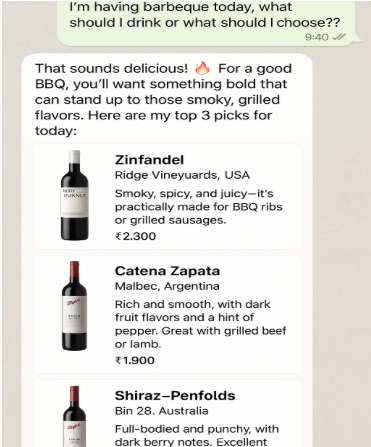
“I’m having a barbecue today, what should I drink or what should I choose?”
Instead of responding with a catalogue, the AI understands the context: BBQ + smoky flavours + grilled food.
AI Wine Assistant:
“That sounds delicious! For a good BBQ, you’ll want something bold that can stand up to those smoky, grilled flavours.
Here are my top 3 picks for today:”
🍷 1. Zinfandel — Ridge Vineyards, USA
Smoky, spicy, and juicy—practically made for BBQ ribs or grilled sausages.
₹2,300
🍷 2. Malbec — Catena Zapata, Argentina
Rich and smooth, with dark fruit flavours and a hint of pepper. Great with grilled beef or lamb.
₹1,900
🍷 3. Shiraz — Penfolds Bin 28, Australia
Full-bodied and punchy, with dark berry notes. Excellent for anything charred.
₹2,700
And instead of ending with:
“Here are your search results.”
the assistant keeps the conversation going:
“Want to grab a bottle? I can help you place the order right here.”
[Order Now] [More Info]
Now the AI isn’t just recommending a product.
It’s helping the customer make a decision and take the next step.
Use Case 2: “We’re Having a New Year Party!”
Now imagine the same assistant being used for a completely different occasion.
It’s New Year’s Eve.
Friends are coming over.
Steak and grilled meat are on the menu.
You open WhatsApp and ask:
Customer:
“We’re having a New Year party tonight. What will go best with steak and meat?”
The customer hasn’t mentioned a wine type, brand, price range, or region.
They’ve simply described the occasion and the food.
The AI can turn that into a useful recommendation.
AI Wine Assistant:
“Ooh, steak and celebration? You’re speaking my language!
Here are 3 wines that pair beautifully with rich meats and will impress your guests:”
🥩 1. Cabernet Sauvignon — Silver Oak, USA
Bold and structured, with dark cherry and oak—perfect for steak.
₹4,500
🍷 2. Rioja Reserva — Marqués de Riscal, Spain
Elegant and earthy, with just enough spice to complement grilled meats.
₹3,200
🍷 3. Bordeaux Blend — Château Pichon Baron, France
Deep, complex, and silky—ideal for a special occasion like tonight.
₹6,000
And again, the assistant doesn’t leave the customer wondering what to do next:
“I can set aside your favourite and arrange delivery. Want me to help with that?”
[Yes, Let’s Order] [Tell Me More]
The customer can continue the journey without switching to another application.
What’s Actually Happening Behind the Conversation?
To the customer, it looks effortless.
But behind the scenes, the system is connecting several different capabilities.
For the BBQ example:
“I’m having a barbecue today…”
↓
AI identifies the context
Occasion: BBQ
Food: Grilled / smoky food
Recommendation preference: Bold wines
↓
Product / Knowledge Layer
Finds suitable products and their relevant information.
↓
AI Recommendation
Converts product information into a natural, human-friendly response.
↓
Customer Decision
[Order Now]
↓
Commerce Workflow
Order → Payment → Confirmation
The same pattern can work for different customer conversations.
Why This Matters
This approach means the AI doesn’t have to know everything about WhatsApp.
Likewise, the WhatsApp integration doesn’t need to understand how the AI works internally.
Each component has a clear responsibility.
That makes the system easier to:
- Extend
- Debug
- Scale
- Monitor
- Replace or upgrade
- Integrate with other business systems
More importantly, the same architecture can potentially support additional communication channels in the future.
WhatsApp can be one interface without becoming the entire application.
What We Learned
One of the biggest lessons from this exploration was that AI integration is rarely just about the AI model.
The model may generate the response, but a production-ready AI experience depends on everything around it:
Context + Business Rules + Data + Authentication + APIs + Monitoring + AI
The interesting engineering work often happens in the layers connecting these pieces together.
From Experiment to Possibility
What started as an exploration of “Can we integrate AI with WhatsApp?” evolved into a much broader question:
“How can familiar communication platforms become intelligent business interfaces?”
This opens possibilities across customer support, commerce, lead qualification, order management, FAQs, internal assistants, and automated business workflows.
The experiment wasn’t just about making an AI chatbot reply to WhatsApp messages.
It was about exploring a new way for businesses and customers to interact—with AI working behind a familiar interface.
What’s Next?
The next stage is to take the learnings from the POC and explore production-level requirements such as:
- Better conversation memory
- Authentication and user identification
- Human handoff
- AI guardrails
- Analytics and monitoring
- Cost and token management
- Business-specific workflows
- Multi-tenant support
- Scalability and reliability
The real opportunity is not simply putting AI inside WhatsApp.
It is building a reusable foundation where AI can become part of the way a business communicates, sells, supports, and operates.